
OpenCode / local server
Run One OpenCode Server for Every Terminal Client
A terminal client should connect to the OpenCode server I already started instead of quietly creating another island.
By Ryan Vogel 5 minute read

I use OpenCode from more than one terminal, and OpenCode can also be the server behind a custom client. That makes the relationship between a client, a running server, a directory, and an existing session more important than it first appears. If every client starts from its own isolated assumption, work that is already running becomes unnecessarily hard to find.
Two OpenCode changes addressed different sides of that problem. The first let custom clients list recent sessions across directories. The second let terminal UI instances discover an OpenCode server that was already running. Together they make one local server much more useful without pretending that directories and sessions are the same thing.
Start the discoverable server once
The beta workflow begins with one command:
opencode serve --discoverable
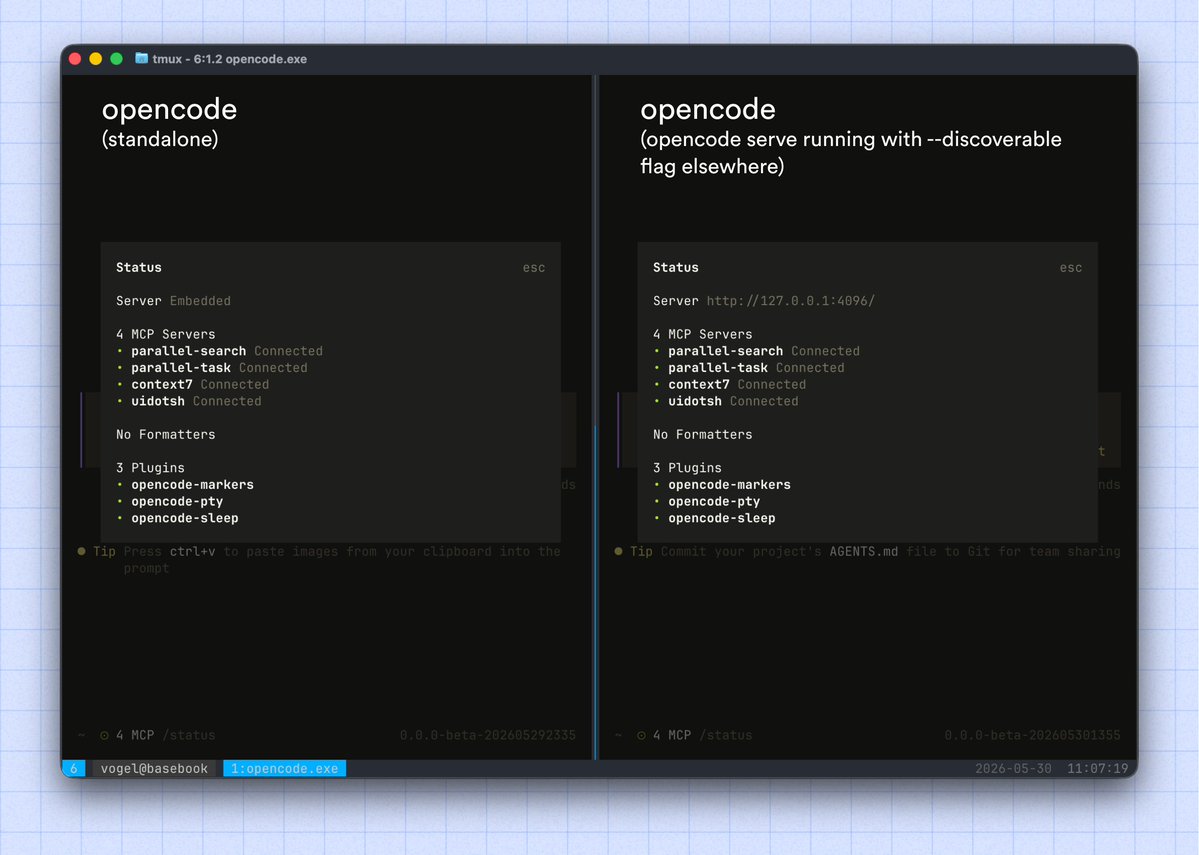
After that server is running, later OpenCode TUI instances automatically discover it and connect to it. The practical difference is easy to feel: I do not have to manually carry a server address into every new terminal session, and each terminal does not have to act as if it is the first OpenCode client on the machine.
There is also a direct way to verify the connection. Inside OpenCode, I can run:
/status
The status view tells me which server the TUI is connected to. That check is important because automatic discovery should not be invisible magic. If I am about to continue existing work or test a server change, I want a concrete answer about the connection I am using.
I run /status whenever I open a terminal from a different directory and expect it to join the same server. Seeing the connection there catches a wrong assumption before I start another session or send a prompt to a server I did not mean to use.
The workflow I use is exactly that small: start opencode serve --discoverable, open a later TUI instance, and check the connection with /status. I have not described the discovery protocol, how selection should work with several servers, or a permission model, so I am not going to invent those details.
I called the global session route experimental when I introduced it in February. Discoverable-server behavior arrived in beta in May. Those labels were intentional: both features were useful in my workflow, but I was still leaving room for their interfaces to change.
Let custom clients see sessions across directories
The earlier change came from the custom-client side. OpenCode added an experimental server route called Global Session List. When an OpenCode server runs from a top-level directory—for example, the home directory represented by ~—a custom client can list recent sessions across directories.
That is different from server discovery. Discovery answers, “Which running server is this TUI connected to?” The global session list answers, “Which recent sessions can this custom client list through a server started high enough in the directory tree?” Keeping those questions distinct makes the workflow easier to reason about.
My example shows a TypeScript view of recent session directories beside a request for session data. I ran the server from a top-level directory because I wanted that custom client to span my work. That is a useful option, not an instruction to give every client the broadest possible directory.
One server, several useful views
The resulting model is simple from a user's perspective. I can start one discoverable OpenCode server. Terminal clients opened afterward can find that running process, and /status gives me a way to confirm the connection. A custom client can use the global session-list behavior to present recent sessions from multiple directories when the server was started from an appropriate top-level location.
I have not covered every lifecycle edge here. Server restarts, simultaneous discoverable servers, remote hosts, access controls, and the definition of “recent” all need their own tests and documentation.
The improvement I wanted is already useful: OpenCode clients can share an already running local server instead of each beginning from zero, and custom interfaces can see work beyond a single directory. /status tells me where a terminal connected, while session listing gives a custom client a view across the directories I chose to include.
The original posts

Ryan Vogel
@ryanvogel · May 30, 2026
now in @opencode beta: run 𝚘𝚙𝚎𝚗𝚌𝚘𝚍𝚎 𝚜𝚎𝚛𝚟𝚎 --𝚍𝚒𝚜𝚌𝚘𝚟𝚎𝚛𝚊𝚋𝚕𝚎 once every 𝚘𝚙𝚎𝚗𝚌𝚘𝚍𝚎 TUI instance after that auto discovers and connects to the already running server run /status to see what server you are connected too https://t.co/oGZjsFePJR
Ryan Vogel
@ryanvogel · February 20, 2026
in the next release of @opencode there is a new experimental server route "Global Session List" If you run an opencode server from a top-level directory (e.g., ~), custom clients can now list all recent sessions across directories. https://t.co/7Cs2lfgDm3